
Systems can go wrong, just when you need them, so some provision is made for that unwanted contingency.
If WiFi fails
Wifi should automatically “fail-over” to mobile network (using an RUT240 bridged router with an Aldi sim card). Details for recharge of Pay as You Go and enabling remote control of the pump in this way will be provided to authorised users of the system as appropriate.
SMS Control of Pump
Even if there is no wifi and the fail-over does not work, you can start the pump by texting “Start” to a mobile number - also provided to authorised users - (which connects to an Aldi sim card in the SMSF pump control module).
Texting “Stop” should stop the pump. “Status?” will report the current status of the pump (which if it is not going will misleadingly report “alarm”). Operating this requires your mobile phone number to be registered in the module.
If Home Assistant fails or controls will not respond – use Tuya app to reset
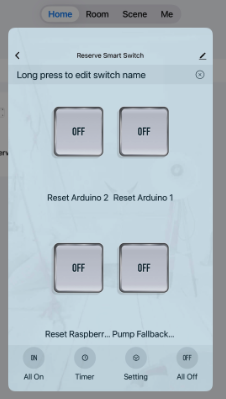
You can reset the Raspberry Pi which runs Home Assistant (as well as the Arduino’s which run sensors and remote valves) using the Tuya Smart App. Whilst you can use it from the dashboard, it also operates independently over wifi with its app.
If you click on the relevant switch the panel below will pop up and you will see options to reset Arduino 1, Arduino 2 and Raspberry Pi. Simply toggle any of these switches on and then off and the device will reset.
If you have to reset the Raspberry Pi then it is quite possible that the AR1 Arduino will also need to be rebooted. You can do this in System Health by toggling the AR1 Reboot button.
If all communication fails the system will automatically enter Autonomous Mode and continue to implement pre-programmed decisions based on sensor input
<< Video Camera and Apps | | Additional Panels & Autonomous Mode >>