
 |
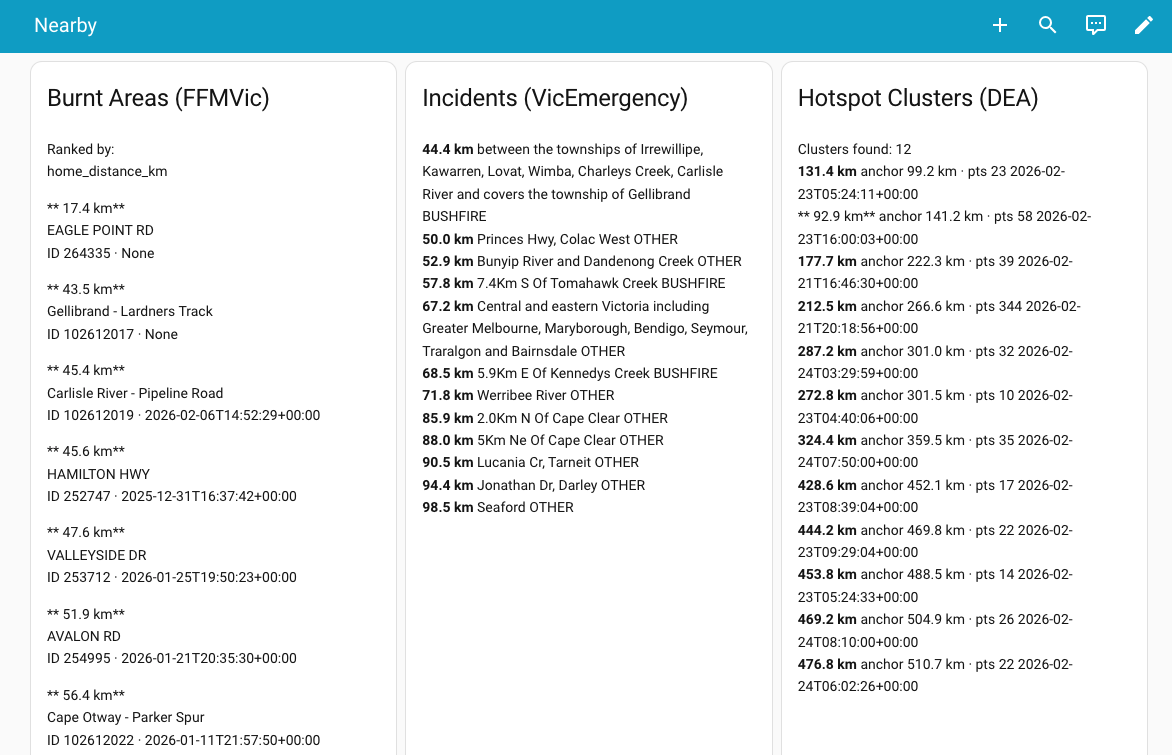
The Current Fires Comparisons table places the three independent perspectives side by side so you can understand why a particular fire geometry has been selected — or why others have been rejected.
It is normal for one or more columns to be empty at times. An empty column usually means that no credible data of that type exists under the current settings, not that the system has failed.
Burnt Areas (FFMVic)
This column shows confirmed burnt-area boundaries derived from field reports and mapping. Where available, these provide the highest-confidence fire geometry because they represent observed fire extent rather than inferred activity.
Distances are calculated to the nearest boundary of each burnt area. These entries are ranked by proximity to the site.
Incidents (VicEmergency)
This column lists reported fire incidents and management events from VicEmergency, ordered by distance. Incident points indicate the location of a reported event but do not represent fire size or shape.
Incident data provides authoritative context and anchoring, but on its own is a weak indicator of fire proximity.
Hotspot Clusters (Digital Earth Australia bushfire monitoring system)
This column shows clusters of recent satellite heat detections. Individual hotspots are grouped into clusters to infer possible active fire fronts.
Only clusters meeting minimum density and recency criteria are shown. Clusters may appear here which are not used in the table as being currently out of reasonable contention as actual threats.
The Current Fires Comparisons Dashboard shows the three types of indicators of the distance of a selected fire from the house side by side so that the user can make their own judgements of the situation. Geometry selection logic is not affected by this display.
Why the table matters
Seeing all three perspectives together may help you distinguish: confirmed fire perimeters, reported but potentially distant incidents, and emerging significant or diffuse satellite observed hot spots (as they move in close to real time).
The hot spots map
I have incorporated also a link which will open the West Australian Government's "My FireWatch" hot spots map presented via a Landgate interface. It displays on a map the same hotspots tracked in this dashboard panel's table.
<< Current Fire Threats | | Slider Controls >>