
Systems can go wrong, just when you need them, so some provision is made for that unwanted contingency.
If WiFi fails
Wifi can “fail-over” to the mobile network (using an RUT240 bridged router with an Aldi sim card). The RUT240's mobile data is normally left off, and is turned on by sending it the SMS mobileon (and off again with mobileoff). The RUT240 is connected to the Fritzbox by USB: with its mobile data on, the Fritzbox switches to it automatically after the NBN connection has been down for 10 minutes, and switches back once the NBN has been working again for 20 minutes. When a bushfire threat is imminent, send mobileon so that this failover is ready, and so that the Tuya switches can be reached; send mobileoff once the threat has passed. Details for recharge of Pay as You Go and enabling remote control of the pump in this way will be provided to authorised users of the system as appropriate.
SMS Control of Pump
Even if there is no wifi and the fail-over does not work, you can start the pump by texting “Start” to a mobile number - also provided to authorised users - (which connects to an Aldi sim card in the SMSF pump control module).
Texting “Stop” should stop the pump. “Status?” will report the current status of the pump (which if it is not going will misleadingly report “alarm”). Operating this requires your mobile phone number to be registered in the module.
If Home Assistant fails or controls will not respond – use Tuya app to reset
You can reset the Raspberry Pi which runs Home Assistant, and the Fritzbox router, using the Tuya Smart App. Whilst you can use it from the dashboard, it also operates independently over wifi with its app.
First turn on the RUT240's mobile data. The Tuya relay board is connected to the RUT240's WiFi, not the Fritzbox's, so that it can still be reached when the Fritzbox has failed - but the RUT240's mobile data is normally left off. Before using either Tuya switch:
- Send the SMS mobileon to the RUT240's number (it sometimes needs sending twice).
- Wait 5-10 minutes for the mobile link to come up and the Tuya app to reconnect. Try the switch even if the app still shows the board as offline - its status display is often stale.
- Use the switch: in the Tuya app, ON cuts the power and OFF restores it (switch 1 = Raspberry Pi, switch 2 = Fritzbox). Leave it ON for about 30 seconds, then OFF.
- When the device is back, send the SMS mobileoff to stop using the SIM's data.
If you click on the relevant switch the panel below will pop up and you will see options to power cycle the Raspberry Pi (switch 1) and the Fritzbox router (switch 2). Simply toggle the relevant switch on (power off) and then off (power back on) and the device will restart - remembering that the RUT240's mobile data must be turned on first, as above.
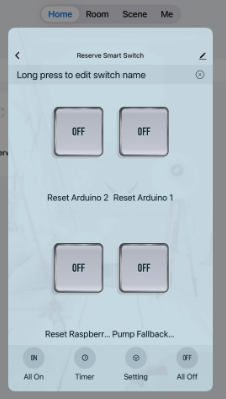
If you have to reset the Raspberry Pi, the AR1 Arduino should reconnect to it by itself within a minute or so of the Pi coming back. AR1 keeps retrying its connection, and if it still cannot connect after 15 minutes it restarts itself (all three Arduinos also have watchdogs that restart them if they freeze - see The Electronic Control Sub-System).
If all communication fails the system will automatically enter Autonomous Mode and continue to implement pre-programmed decisions based on sensor input
Troubleshooting - remote access and communication (technical)
Overview
This section covers the steps to restore service when remote communication with the Fairhaven system breaks down. The ARMAC protection functions (AR2 and AR3 autonomous control) operate independently of internet and continue running during any communication outage. The troubleshooting steps below are concerned with restoring remote visibility and control.
For RPi-level technical recovery commands (Docker, Tailscale, filesystem, watchdog) refer to the Remote Recovery Run Sheet.
Understanding the Communication Layers
Before troubleshooting it helps to understand what is running and how the pieces connect.
Three remote access paths to the system:
- Tailscale and ZeroTier VPNs -- the normal means of SSH access and HA dashboard access. Both provide direct encrypted connections to the RPi. They work well when the FritzBox internet is up but may not function through mobile carrier-grade NAT (CGNAT), so they can fail when the RUT240 mobile failback is active.
- Reverse SSH tunnel -- the RPi maintains a permanent outbound SSH connection to the Contabo VPS. This opens a relay port on the VPS through which a shell connection to the RPi can be made from any location. It works through any internet connection including mobile, because the connection is outbound from the RPi and is not affected by CGNAT. With a local port forward it also provides access to the HA browser interface. This is the primary independent backup when Tailscale and ZeroTier are unavailable.
- Nabu Casa -- this is a cloud relay service providing HA dashboard access. If a Nabu Casa subscription is maintained, the RPi holds a permanent outbound HTTPS connection to the Nabu Casa servers, giving dashboard access through any internet connection. Given that the reverse SSH tunnel now provides an independent path to both shell and HA interface, Nabu Casa is an optional additional layer rather than a requirement and is not currently maintained at the Fairhaven site.
Two internet paths:
- FritzBox -- the primary broadband router.
- RUT240 mobile router -- 4G mobile failback. Provides outbound internet to the RPi when FritzBox WAN is down, enabling the reverse SSH tunnel (and Nabu Casa if maintained) to continue working. Tailscale and ZeroTier may not work through mobile NAT.
Symptom 1 -- Cannot Reach the HA Dashboard
Try in this order:
- Connect via Tailscale or ZeroTier and open HA at the local Tailscale address. If it loads, the system is running normally.
- If Tailscale and ZeroTier fail, try the reverse SSH tunnel with a port forward. With the tunnel running, open http://localhost:8123 in a browser for the full HA interface.
- A Naub Casa subscription is no longer maintained for the Fairhaven site. If a Nabu Casa subscription were maintained, you could try the Nabu Casa URL as an additional check.
- If all paths fail, the RPi is likely down or has no internet -- see Symptom 2.
Symptom 2 -- FritzBox Internet Appears Down
How to recognise it: Tailscale, ZeroTier and the MyFritz remote URL all time out. If the RUT240's mobile data has been turned on, the reverse SSH tunnel may still work (confirming the RPi has mobile internet).
Once its mobile data is on, the FritzBox fails over to the RUT240 mobile router (after 10 minutes of NBN failure), which then provides the internet. If instead the FritzBox itself has hung, failover cannot happen and the FritzBox must be power-cycled, as below. The ARMAC system continues to operate. The reverse SSH tunnel (and Nabu Casa if maintained) remain available. Tailscale and ZeroTier are likely blocked by mobile carrier NAT.
To restore FritzBox internet remotely:
- Send the SMS mobileon to the RUT240 (sometimes twice) and wait 5-10 minutes. This is essential: without it the Tuya switches cannot be reached.
- Optionally confirm the reverse SSH tunnel is reachable, confirming the RPi has mobile internet via RUT240.
- Power cycle the FritzBox using Tuya switch 2 (app ON = power off; leave about 30 seconds, then OFF). Try it even if the app shows the board offline. Wait two minutes.
- If MyFritz responds and Tailscale reconnects, the FritzBox WAN has recovered.
- If the FritzBox does not recover after a power cycle, the fault is with the ISP or the FritzBox hardware. The system remains controllable via the reverse SSH tunnel until a site visit (leave the mobile data on).
- Once the FritzBox is back, send mobileoff to the RUT240.
Symptom 3 -- RPi Appears Completely Offline
How to recognise it: The reverse SSH tunnel does not connect, Tailscale and ZeroTier both fail, and the Tuya switches on both networks are also unreachable.
This means either the RPi has crashed or lost power, or both internet paths are simultaneously down.
Steps:
- Send the SMS mobileon to the RUT240 (sometimes twice) and wait 5-10 minutes - the Tuya switches can only be reached through the RUT240's mobile data.
- Power cycle the RPi using Tuya switch 1 (app ON = power off; leave about 30 seconds, then OFF). Wait two minutes.
- Try the reverse SSH tunnel again. The RPi and HA Docker containers start automatically on boot.
- If the RPi does not respond after a power cycle, a site visit is required. The ARMAC autonomous protection functions (AR2 and AR3) continue operating independently of the RPi.
- Once the RPi is back, send mobileoff to the RUT240.
Symptom 4 -- HA Loads but Shows No Live Data
How to recognise it: The HA dashboard is accessible but sensor readings are stuck at old values, zero, or unavailable.
HA is running but the data pipeline from the Arduino modules has broken. The most likely cause is that one or both Docker containers have stopped, or the Arduino MQTT connection has dropped.
Steps:
- SSH to the RPi by any available path.
- Run
docker ps -aand confirm both the Home Assistant container and the Mosquitto MQTT container show as Up. If either is stopped, restart it withdocker start <container-name>. - If both containers are running, check MQTT is receiving data:
docker logs mosquitto --tail 50. Look for connection messages from AR1 and AR2. - If AR1 is not connected to MQTT, check AR1 WiFi status. (The RS-485 link to AR3 has its own wired backup path, but every command still passes through AR1, so AR1 must itself be connected for commands to work.)
Symptom 5 -- HA Responds but Pump Commands Are Not Executed
How to recognise it: The HA dashboard loads, sensors show live values, but sending a pump on or off command produces no result.
The HA to MQTT to Arduino command chain is broken at some point.
Steps:
- Confirm MQTT is running:
docker ps -a. - Check that Enable Controls is ON (unlocked) and that Autonomous Mode is OFF - when locked, or in Autonomous mode, manual commands are not acted on. (AR3 has no MQTT connection of its own; its WiFi link is only to AR2.)
- Check whether AR1 is connected. AR1 is the primary command relay from HA to AR3 via RS-485. If AR1 has lost WiFi or MQTT, commands will not reach AR3.
- If AR3 is confirmed connected and commands are still not executing, check the relay module wiring and the contactor.
Symptom 6 -- RS-485 Communication Between AR1 and AR3 Has Failed
How to recognise it: AR3 serial log shows no RS-485 frames being received from AR1.
Important: pump command control is not immediately lost. AR1 automatically switches to the SoftwareSerial backup path - two other wires of the same multicore cable - after 15 seconds of RS-485 silence (AR3 enables its end after 10 seconds), and switches back once RS-485 has been steady for 60 seconds. This requires no manual intervention; the pump can still be commanded through HA as normal, though commands may take 2-4 seconds. The steps below are to diagnose and restore the RS-485 bus itself.
Steps:
- Check the BUS ISOLATE switch on the RS-485 A wire at the house end is in the ON (closed) position.
- Check that the Gravity RS-485 module at the house end is powered and its indicator LEDs are active.
- With the BUS ISOLATE switch open, check continuity on each wire -- expect near-zero resistance on each conductor. With the switch closed and the system live, expect approximately 120 ohm across A and B at the shed end (the termination resistor).
- If the Gravity module appears dead, power cycle it by disconnecting and reconnecting its supply. If it does not recover, replace it: open the BUS ISOLATE switch first before powering down or connecting the replacement module.
Symptom 7 -- All Internet Connectivity Lost
How to recognise it: Both the FritzBox and the RUT240 mobile router have lost connectivity simultaneously. All remote access paths (Tailscale, ZeroTier, reverse SSH tunnel) are unreachable.
This is an unusual situation requiring simultaneous failure of both internet paths. The ARMAC system continues to run and protect autonomously.
Pump control options when all internet is down:
- SMS to the pump control. The SIM in the SFS01 pump control module accepts SMS commands (Start, Stop, Status?) from registered phones. This path is independent of internet and operates as long as mobile coverage is available.
- Autonomous mode. If the RUT240 also fails, or if no SMS action is taken, Home Assistant hands over after 5 minutes without internet, and AR3 enters autonomous mode 5 minutes later; if the RPi or AR1 has failed, AR3 enters autonomous mode 5 minutes after the heartbeat from AR1 stops. In autonomous mode AR3 runs the full protection programme based on live sensor data -- pressure, temperature, and level sensors -- without any remote input. The pump will be started and stopped as required to maintain protection. No intervention is needed; the system is designed to fail safely in this mode.
Note: once internet is restored, all remote access paths reconnect automatically. The RPi and AR3 will re-synchronise without manual intervention.
Summary -- Which Paths Survive Which Failures
| Failure | Tailscale / ZeroTier | SSH Tunnel | Nabu Casa (if maintained) | ARMAC Protection |
|---|---|---|---|---|
| FritzBox WAN down, RUT240 active | No | Yes | Yes | Unaffected |
| RPi down | No | No | No | Unaffected |
| HA Docker stopped | Yes (shell only) | Yes (shell only) | No | Unaffected |
| MQTT stopped | Yes | Yes | Yes (dashboard only) | AR3 autonomous continues |
| RS-485 failed | Yes | Yes | Yes | AR1 and AR3 auto-switch to the SoftwareSerial backup |
| All internet down | No | No | No | SMS pump control; then full autonomous mode |
For technical RPi recovery commands (Docker, Tailscale, filesystem, watchdog) refer to Remote Recovery Run Sheet.
<< PUMP MAINTENANCE | | Remote recovery run sheet (Raspberry Pi) >> |Table of Contents>